Unity Debug & Test Toolkit Lite
A downloadable tool
Unity Debug & Test Toolkit Lite
by Syanaia Dev Tools
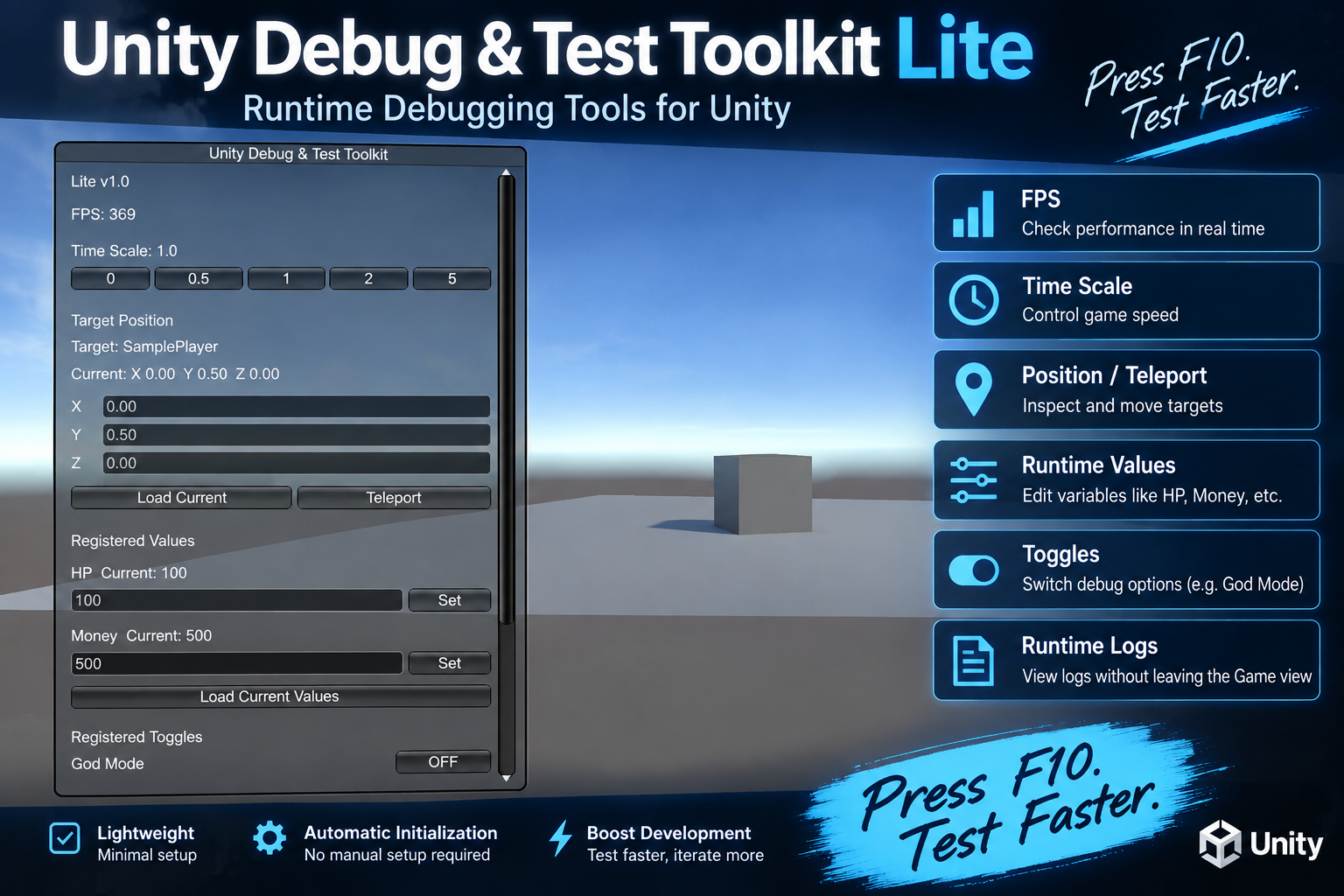
A free runtime debugging and testing toolkit designed to make Unity development easier.
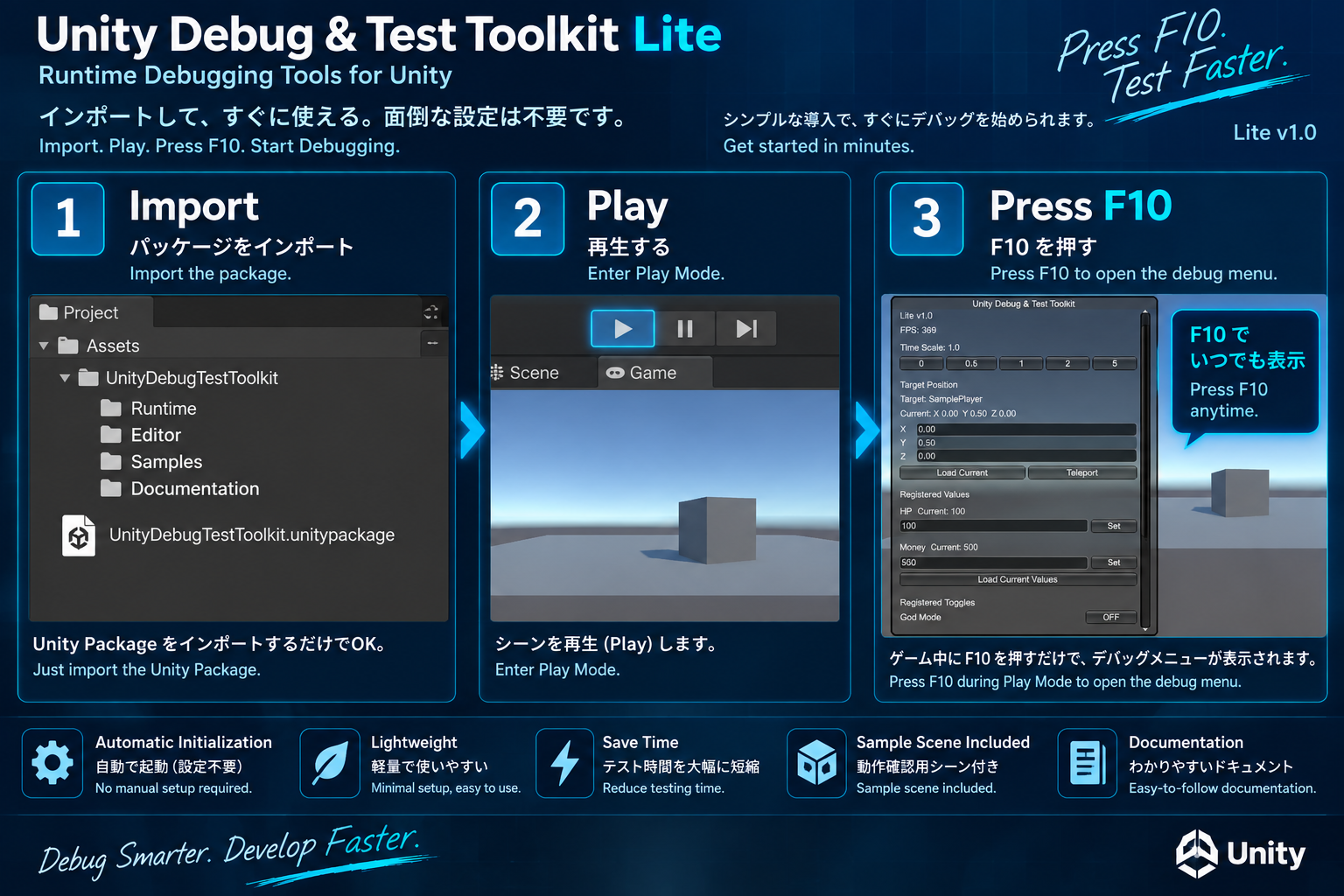
Press F10 while your game is running to open the debug menu.
FEATURES
• Open / close the debug menu with F10
• FPS display
• Time Scale controls
0 / 0.5 / 1 / 2 / 5
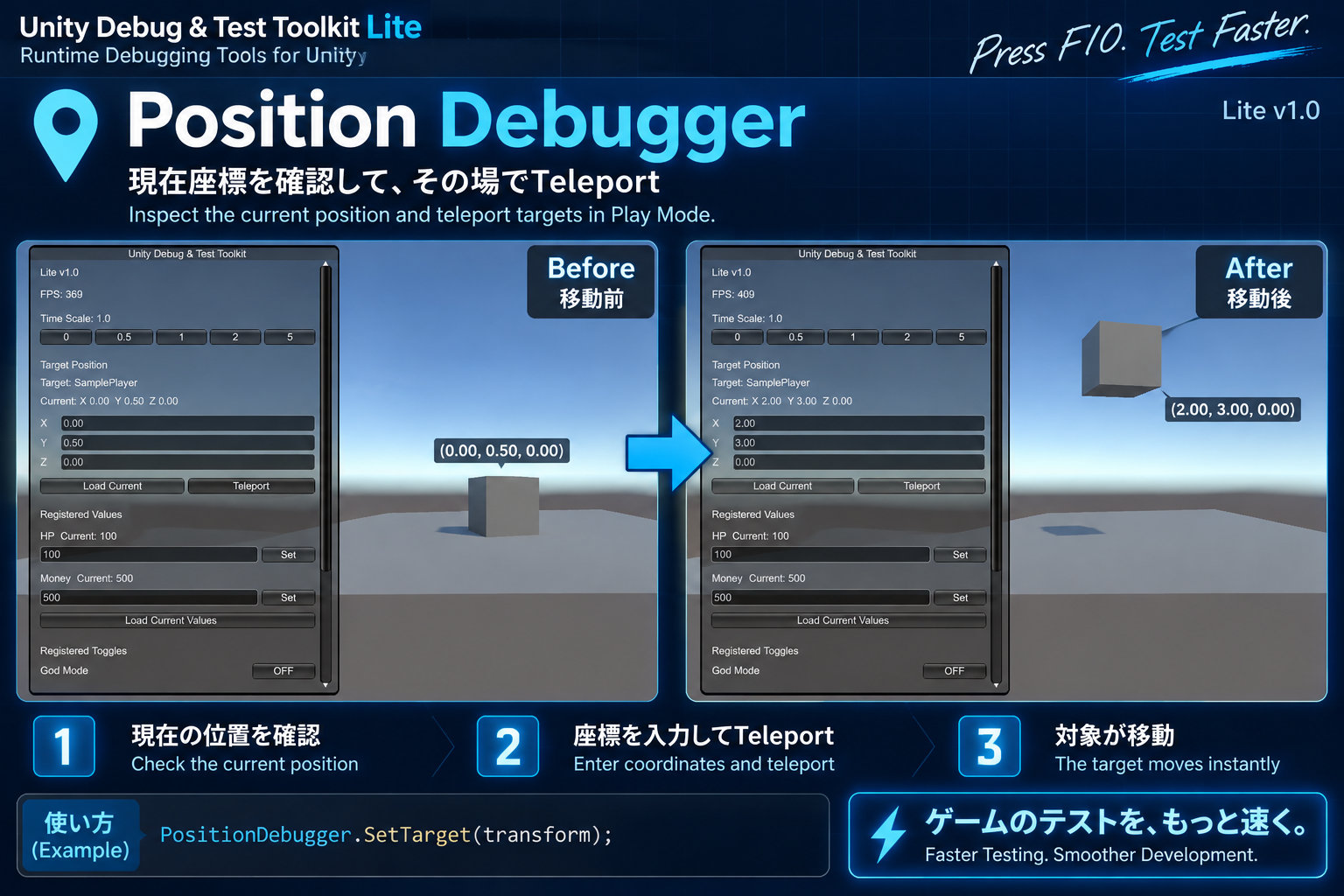
• Position Debugger
- Register a Transform target
- Display current X / Y / Z coordinates
- Load the current position into the coordinate fields
- Teleport the target to custom X / Y / Z coordinates
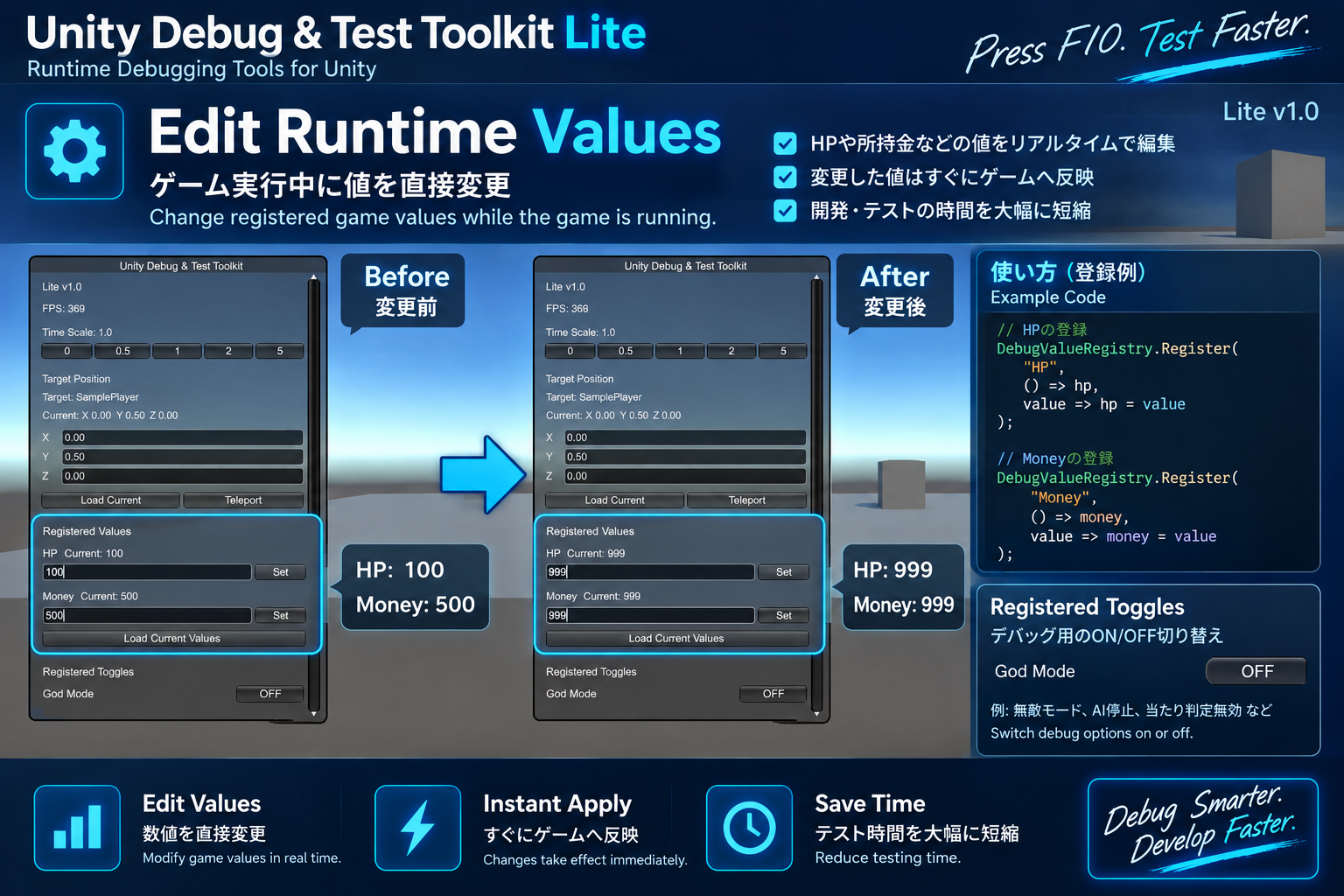
• Debug Value Registry
Register custom numeric values from your game and edit them during Play Mode.
Examples:
- HP
- Money
- Experience
- Speed
HP and Money are demonstrated in the included sample.
Other numeric values can be registered from your own game code.
• Debug Toggle Registry
Register custom boolean values and switch them ON / OFF during Play Mode.
Examples:
- God Mode
- Invincible
- No Clip
God Mode is demonstrated in the included sample.
Other boolean values can be registered from your own game code.
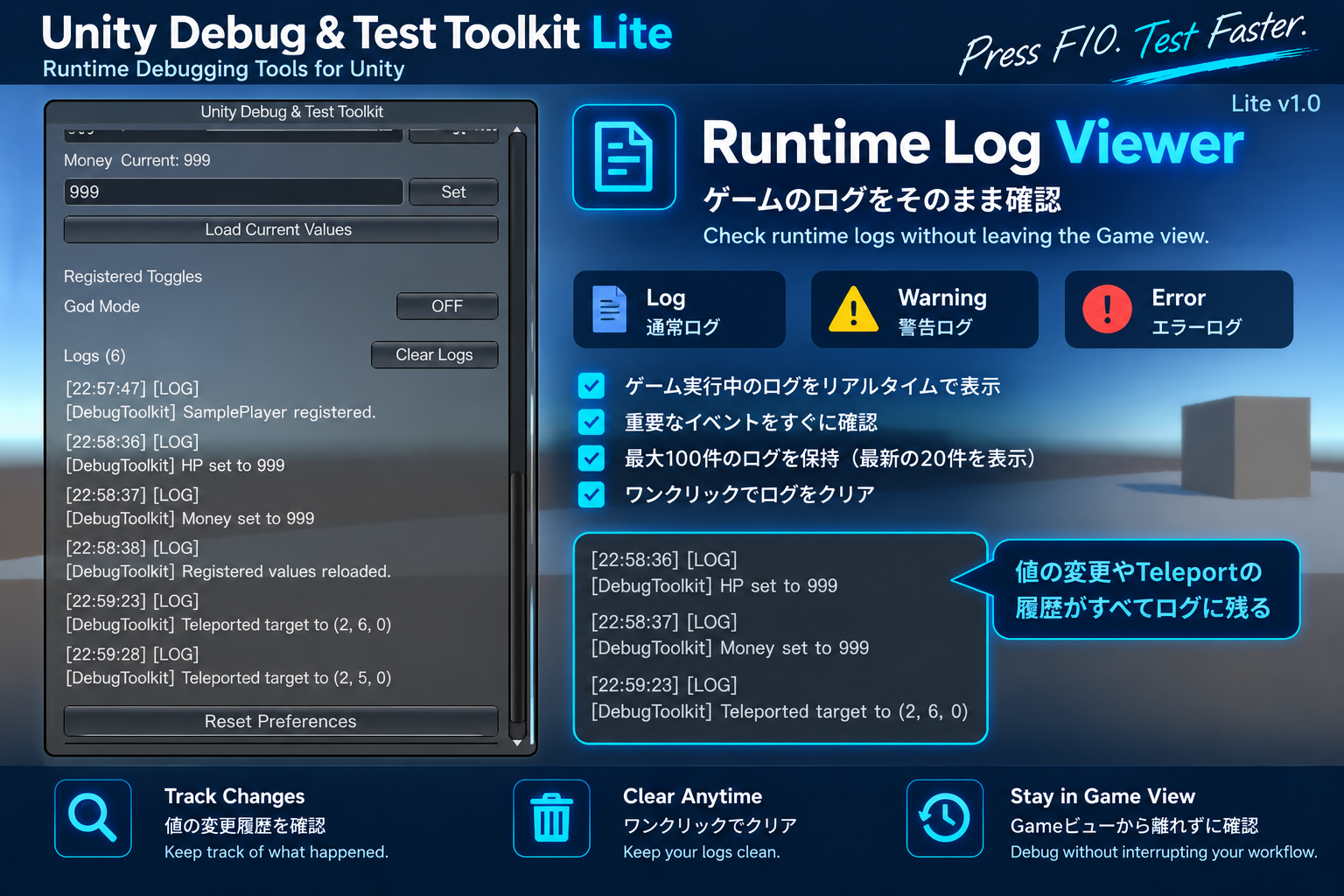
• Runtime Log Viewer
- Log
- Warning
- Error
• Stores up to 100 log entries
• Displays the latest 20 entries
• Clear Logs support
• Scrollable debug window
• Saved window position
• Reset Preferences
• Persists between scene changes
• Duplicate instance protection
• Automatic toolkit initialization
QUICK SETUP
1. Import Unity Debug & Test Toolkit Lite into your Unity project.
2. Enter Play Mode.
3. Press F10.
The toolkit initializes automatically.
No manual DebugToolkit GameObject setup is required.
CODE EXAMPLES
Register a position target:
PositionDebugger.SetTarget(transform);
Register a numeric value:
DebugValueRegistry.Register(
"HP",
() => hp,
value => hp = value
);
Register an ON / OFF value:
DebugToggleRegistry.Register(
"God Mode",
() => godMode,
value => godMode = value
);
INCLUDED
• Runtime
• Sample Scene
• Sample integration script
• Japanese README
• English README
• Japanese Quick Start Guide
• English Quick Start Guide
• LICENSE
• CHANGELOG
TESTED WITH
Unity 6.3 LTS
Unity 6000.3.24f1
Windows 64-bit
The current Runtime assembly uses the Unity Input System.
LITE VERSION
The Lite version is free to use.
You may integrate it into commercial and non-commercial games and applications and modify the source code for your own projects.
Redistribution or resale of the toolkit itself, or modified versions of the toolkit as standalone Unity assets, tools, or templates, is not permitted.
See the included LICENSE.txt for full license terms.
日本語
===============================
Unity Debug & Test Toolkit Lite は、
Unityゲーム開発中のデバッグ・テスト作業を簡単にする
無料のランタイムデバッグツールです。
ゲームをPlayした状態でF10を押すだけで、
デバッグメニューを開くことができます。
主な機能
• F10でデバッグメニューを開閉
• FPS表示
• Time Scale変更
0 / 0.5 / 1 / 2 / 5
• Position Debugger
- 対象Transformの登録
- 現在のX / Y / Z座標表示
- 現在座標を入力欄へ読み込み(Load Current)
- 指定したX / Y / Z座標へのTeleport
• Debug Value Registry
ゲーム側の任意の数値を登録し、
Play中に確認・変更できます。
登録例:
- HP
- Money
- Experience
- Speed
HP / Moneyは付属Sampleで使用しています。
Experience / Speedなどの数値もゲーム側から任意に登録できます。
• Debug Toggle Registry
ゲーム側の任意のbool値を登録し、
Play中にON / OFFを切り替えることができます。
登録例:
- God Mode
- Invincible
- No Clip
God Modeは付属Sampleで使用しています。
Invincible / No Clipなどのbool値もゲーム側から任意に登録できます。
• Runtime Log Viewer
- Log
- Warning
- Error
• ログ最大100件保持
• 最新20件を表示
• Clear Logs対応
• 縦スクロール対応
• ウィンドウ位置保存
• Reset Preferences
• シーン切り替え後もToolkitを維持
• 重複起動防止
• Toolkit本体の自動初期化
簡単な導入
1. Unity Debug & Test Toolkit LiteをUnityプロジェクトへ追加
2. Play Modeを開始
3. F10を押す
Toolkit本体は自動的に初期化されるため、
Toolkit用GameObjectを手動で配置する必要はありません。
コード例
座標対象の登録:
PositionDebugger.SetTarget(transform);
数値の登録:
DebugValueRegistry.Register(
"HP",
() => hp,
value => hp = value
);
ON / OFFの登録:
DebugToggleRegistry.Register(
"God Mode",
() => godMode,
value => godMode = value
);
収録内容
• Runtime
• Sample Scene
• Sample integration script
• 日本語README
• 英語README
• 日本語Quick Start
• 英語Quick Start
• LICENSE
• CHANGELOG
開発・動作確認環境
Unity 6.3 LTS
Unity 6000.3.24f1
Windows 64-bit
現在のRuntime構成ではUnity Input Systemを使用します。
Lite版について
Lite版は無料で利用できます。
自分のゲームやアプリへの組み込み、
商用利用、非商用利用、
プロジェクトに合わせたコード改変が可能です。
Toolkitそのもの、またはToolkitの改変版を
独立したUnityアセット、ツール、テンプレートとして
再配布・再販売することは禁止しています。
詳しい利用条件については、
同梱のLICENSE.txtをご確認ください。
FUTURE DEVELOPMENT / 今後の予定
More advanced debugging and testing features are planned for future editions.
今後、より高度なデバッグ・テスト機能を搭載した
上位版の開発も予定しています。
Syanaia Dev Tools
Download
Install instructions
Installation / インストール方法
[English]
1. Download UnityDebugTestToolkit_Lite_v1.0.unitypackage.
2. Open your Unity project.
3. Double-click the downloaded .unitypackage file, or import it from Unity.
4. In the Import Unity Package window, select the included files and click Import.
5. Enter Play Mode.
6. Press F10 to open or close the Unity Debug & Test Toolkit.
Tested Environment:
- Unity 6.3 LTS (6000.3.24f1)
- Unity Input System
- Windows 64-bit
See the included README and Quick Start Guide for setup and integration examples.
[日本語]
1. UnityDebugTestToolkit_Lite_v1.0.unitypackage をダウンロードします。
2. 使用するUnityプロジェクトを開きます。
3. ダウンロードした .unitypackage をダブルクリックするか、Unityからインポートします。
4. Import Unity Package画面で収録ファイルを選択し、Importを押します。
5. Play Modeを開始します。
6. F10を押すとUnity Debug & Test Toolkitを開閉できます。
動作確認環境:
- Unity 6.3 LTS (6000.3.24f1)
- Unity Input System
- Windows 64-bit
詳しい導入方法とゲームへの組み込み例は、同梱のREADMEおよびQuick Start Guideをご確認ください。